
DMX512 is a digital control protocol used to manage lighting fixtures and effects across commercial architectural lighting systems. In RGB and RGBW applications, DMX512 allows multiple fixtures to be controlled individually or together for color selection, dimming, scenes, and synchronized effects.
For building façades, hospitality properties, campuses, landmarks, bridges, entertainment venues, and other large-scale installations, DMX512 provides a structured way to coordinate color-changing lighting across multiple fixtures and zones.
This guide explains how DMX512 architectural lighting control works, including channels, addressing, controllers, zones, scenes, and key considerations when planning a commercial RGBW lighting system.
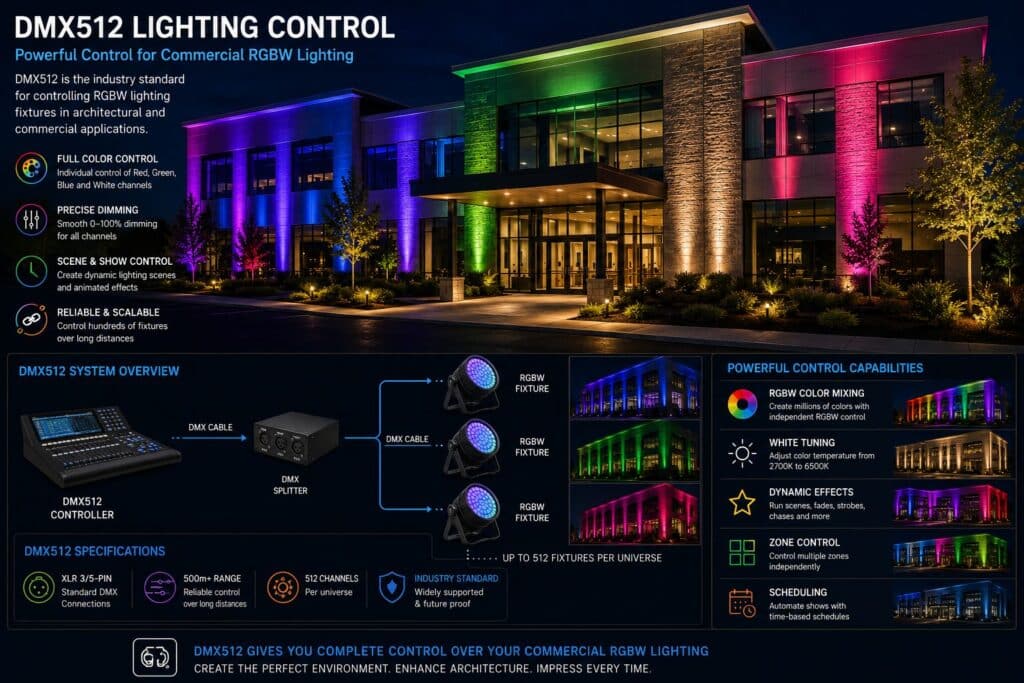
DMX512 lighting control allows commercial RGBW fixtures to operate as one synchronized architectural lighting system, creating dynamic lighting scenes for buildings, bridges, stadiums, hotels, and public spaces.
Planning a Commercial RGBW Lighting System?
LED PROS WorldWide can help identify compatible RGB and RGBW fixtures for architectural projects requiring coordinated colors, dimming, scenes, and DMX512 control. Explore our RGB LED Lights for commercial color-changing fixture options.
Request a Quote or call 844-533-7767 with your project drawings, fixture quantities, voltage, mounting information, desired lighting effects, and control requirements.
What Is DMX512?
DMX512 is a digital communication protocol used to control lighting fixtures and related devices. A DMX universe provides up to 512 control channels, with each channel carrying a control value that can be assigned to a fixture function such as color, intensity, or another supported parameter.
In a commercial RGBW lighting system, a fixture may use separate channels for:
-
Red
-
Green
-
Blue
-
White
-
Dimming or other fixture functions, depending on the product
Each fixture is assigned a DMX starting address so the controller knows which channels operate that fixture. Multiple fixtures can use the same address when they need to respond together, or different addresses when individual or zoned control is required.
This addressing structure allows DMX512 to coordinate many color-changing fixtures across building façades and larger architectural lighting installations.
How DMX512 Controls RGBW Architectural Lighting
In an RGBW architectural lighting system, the DMX512 controller sends commands to compatible fixtures based on their assigned addresses and channels. This allows the lighting system to control individual fixtures, groups of fixtures, or multiple zones across a property.
Depending on the fixtures and controller, DMX512 can be used to manage:
-
Color selection — Adjust the red, green, blue, and white channels to create the desired color or white-light output.
-
Dimming — Increase or decrease fixture output for different scenes or operating conditions.
-
Scenes — Store predefined colors and lighting configurations for holidays, events, branding, or everyday operation.
-
Color transitions — Create fades and other programmed changes between colors or scenes.
-
Fixture zones — Control different areas of a building or property independently.
-
Synchronized effects — Coordinate multiple fixtures across façades, architectural features, and larger installations.
For example, a commercial property could operate several façade zones in a consistent white-light scene during normal evenings, then switch those same RGBW fixtures to coordinated colors for a holiday, event, or branding program.
The required controller, number of channels, addressing plan, and system architecture should be determined before fixtures and control components are ordered.
DMX Channels, Addresses and Universes
Understanding channels, addresses, and universes helps determine how many RGBW fixtures a DMX512 system can control and how independently those fixtures can operate.
-
Channels — Individual control values assigned to fixture functions such as red, green, blue, white, dimming, or other supported features.
-
Addresses — The starting channel assigned to each fixture. Fixtures with different addresses can be controlled independently, while fixtures assigned to the same channels can respond together.
-
Universes — A single DMX universe contains up to 512 channels. Larger architectural lighting systems can use multiple universes when additional control channels are required.
For example, an RGBW fixture using four channels for red, green, blue, and white requires four DMX channels. However, some commercial fixtures use additional channels for dimming or other functions, so the actual channel count must be confirmed from the fixture’s DMX documentation.
Large building-wide systems should be planned around the required fixture quantities, zones, channel counts, and desired level of individual control rather than assuming every RGBW fixture uses the same number of channels.
DMX512 Controllers and System Components
A commercial DMX512 architectural lighting system typically includes several components that must work together:
-
DMX controller — Stores and sends commands for colors, dimming, scenes, schedules, and programmed effects.
-
DMX-compatible RGB or RGBW fixtures — Receive control signals and respond according to their assigned addresses and channels.
-
Signal distribution components — May be required to distribute or extend the DMX signal across larger installations.
-
Power supplies or drivers — Provide the electrical power required by the fixtures and must be compatible with the selected lighting system.
-
Control and signal wiring — Connects system components according to the fixture and controller requirements.
The exact system architecture depends on the fixture type, quantity, distances between components, number of control zones, and complexity of the desired lighting effects.
Most importantly, confirm fixture, driver, controller, and control-protocol compatibility before ordering. Selecting the lighting fixtures first and determining the control system afterward can create unnecessary compatibility and installation problems.
Planning a Commercial DMX512 Architectural Lighting System
DMX512 controls should be planned as part of the property’s overall industrial lighting system, particularly when RGBW fixtures must be integrated into a building-wide lighting control system.
Before specifying the system, consider:
-
Fixture quantities and locations — Determine which architectural features will be illuminated and where fixtures will be mounted.
-
RGB or RGBW requirements — Decide whether the project primarily requires color effects or also needs dedicated white illumination.
-
Independent control — Identify which fixtures or areas need to operate separately and which can operate together.
-
Scenes and scheduling — Define expected everyday lighting, branding colors, holidays, events, and other programmed scenes.
-
System scale — Confirm channel requirements and whether the project can operate within one DMX universe or requires additional capacity.
-
Future expansion — Consider whether additional fixtures, zones, or architectural features may be added later.
Planning these requirements before equipment is ordered makes it easier to select compatible fixtures and controls and establish an appropriate DMX512 system architecture.
Selecting RGBW Fixtures for DMX512 Control
Not every color-changing fixture provides the same DMX capabilities. Before selecting RGB or RGBW fixtures for an architectural lighting system, confirm that the fixture supports the control functions required by the project.
Key considerations include:
-
DMX512 compatibility — Confirm the fixture supports DMX512 control and review its available operating modes.
-
Channel requirements — Determine how many DMX channels each fixture uses for color, white light, dimming, and other functions.
-
RGB vs RGBW — RGBW fixtures add a dedicated white channel when both color-changing effects and white architectural illumination are required. For a more detailed comparison of fixture configurations, see our RGB vs RGBW vs RGBWW Lighting Guide.
-
Light output and beam angle — Match fixture output and optical distribution to the illuminated surface and mounting distance.
-
Outdoor ratings — Verify that fixtures are suitable for the environmental conditions at the installation location.
-
Mounting and aiming — Confirm available mounting options allow the fixture to illuminate the intended architectural feature effectively.
For more detailed guidance on fixture output, optics, mounting distance, and white-light characteristics, see our RGBW Flood Light Brightness, Beam Angle & Color Temperature Guide.
Commercial Applications for DMX512 Architectural Lighting
DMX512 is well suited to commercial architectural projects where multiple color-changing fixtures need to operate together or change for different events, seasons, and operating conditions.
Common applications include:
-
Building façades — Coordinate RGBW flood lights across walls, columns, entrances, rooflines, and other architectural features.
-
Hotels and resorts — Create programmed scenes for everyday operation, events, holidays, and seasonal displays.
-
Corporate properties — Use coordinated colors for branding, special events, and building identity.
-
Universities and campuses — Display school colors and create lighting scenes for athletics, graduations, and campus events.
-
Municipal buildings and landmarks — Program lighting for holidays, civic events, awareness campaigns, and community celebrations.
-
Bridges and public spaces — Synchronize color-changing fixtures across larger architectural structures and installations.
-
Entertainment and mixed-use properties — Coordinate multiple lighting zones and scenes across complex exterior environments.
DMX512 is particularly useful when a project requires repeatable scenes, independent control of different areas, or synchronized operation across multiple fixtures.
For additional examples of how programmable RGB and RGBW flood lights are used on commercial properties, see our Color Changing LED Flood Lights for Architectural Lighting.
DMX512 vs. Bluetooth vs. Wi-Fi Controls
DMX512, Bluetooth, and Wi-Fi can all be used with color-changing lighting, but they serve different project requirements.
-
DMX512 — Well suited to commercial architectural systems requiring coordinated control of multiple fixtures, zones, scenes, and synchronized lighting effects.
-
Bluetooth — Can provide convenient local control for smaller or simpler installations but may not provide the system architecture required for large building-wide projects.
-
Wi-Fi or network-based controls — Can support remote access and app-based operation, depending on the fixture and control platform, but system capabilities vary significantly by manufacturer.
For larger RGB and RGBW architectural lighting projects, the control method should be selected based on fixture quantity, required synchronization, control zones, system scale, and desired lighting effects rather than convenience alone.
Common DMX512 Planning Mistakes
Many DMX512 problems can be avoided by defining the lighting and control requirements before fixtures are ordered.
Common mistakes include:
-
Selecting fixtures before the control system — Fixture capabilities, DMX modes, controllers, and drivers need to be compatible.
-
Assuming every RGBW fixture uses the same number of channels — Channel requirements vary by fixture and operating mode.
-
Not planning fixture addressing and control groups — Determine which fixtures need individual control and which should operate together.
-
Underestimating system size — Larger projects may require additional DMX universes or signal-distribution components.
-
Ignoring future expansion — Additional façades, fixtures, or zones can affect the original control-system design.
-
Treating controls as an installation detail — Desired colors, scenes, scheduling, synchronization, and control requirements should be established during project planning.
For projects using color-changing architectural flood lights, define the desired lighting effects first and then select compatible fixtures and controls to produce them.
Scheduling Architectural Lighting Throughout the Year
One advantage of a programmable architectural lighting system is the ability to create scenes for different events and operating schedules without changing fixtures.
Commercial properties can develop lighting programs for:
-
Everyday operation — Standard white light or a consistent architectural color scheme.
-
Corporate and brand events — Company colors, product launches, conferences, and special events.
-
Holidays and seasonal displays — Predetermined colors and scenes for recurring dates throughout the year.
-
Schools and universities — School colors for athletics, graduations, homecoming, and campus events.
-
Municipal and community events — Civic celebrations, awareness campaigns, and other scheduled programs.
DMX512 controllers and associated control systems can store and recall scenes, while scheduling capabilities depend on the specific controller and system configuration. Planning recurring lighting programs in advance can simplify operation of larger architectural installations.
Buyer Q&A
Do all RGBW fixtures work with DMX512?
No. Confirm that the fixture specifically supports DMX512 and that its operating modes, drivers, and other control components are compatible with the planned system.
Can multiple RGBW fixtures be synchronized?
Yes. Compatible DMX512 fixtures can be addressed and programmed to operate together, allowing coordinated colors, dimming, scenes, and effects across multiple architectural features.
Can different areas of a building be controlled separately?
Yes. Fixtures can be assigned to different addresses or control groups so façades, entrances, rooflines, landscape features, and other areas can operate independently when the system is designed for that capability.
How do I know how many DMX channels my project requires?
Channel requirements depend on the number of fixtures, their DMX operating modes, and how independently they need to be controlled. The fixture’s DMX documentation identifies how many channels each operating mode requires.
What information should I provide when requesting a quote?
Provide building elevations or drawings, fixture quantities and locations, voltage, mounting information, desired colors and white-light requirements, expected scenes or effects, and any existing DMX512 or control-system specifications. If the complete control design has not been determined, provide the available project information and describe how you want the lighting system to oper
Get Help With Your DMX512 Architectural Lighting Project
LED PROS WorldWide can help identify compatible RGB and RGBW fixtures for commercial architectural lighting projects requiring DMX512 control, synchronized colors, dimming, scenes, and building-wide lighting effects.
Send us your building elevations or drawings, fixture quantities and locations, voltage, mounting information, desired colors and white-light requirements, and DMX512 or control specifications. If the complete system has not yet been designed, send what you have and describe the lighting effects and level of control you want to achieve.
Request a Quote or call 844-533-7767 to discuss your project.
Frequently Asked Questions About DMX512 Architectural Lighting
What is DMX512 architectural lighting control?
DMX512 is a digital control protocol used to manage compatible lighting fixtures. In commercial architectural RGB and RGBW systems, it can control colors, intensity, scenes, fixture groups, and synchronized lighting effects.
How many lighting fixtures can DMX512 control?
The number depends on how many DMX channels each fixture requires and how independently the fixtures need to operate. One DMX universe provides up to 512 channels, and larger systems can use additional universes.
Can DMX512 control RGBW lighting?
Yes. Compatible RGBW fixtures can use DMX channels to control red, green, blue, and white output along with dimming and other supported fixture functions.
Can DMX512 control multiple fixtures at the same time?
Yes. Fixtures can be addressed and grouped so they operate together or independently. This allows coordinated lighting across building façades, campuses, landmarks, bridges, and other large architectural installations.
Can DMX512 be used for building-wide lighting control?
Yes. DMX512 can be incorporated into building-wide architectural lighting systems where multiple compatible fixtures or areas require coordinated colors, scenes, dimming, and synchronized operation. The system architecture should be planned around the fixture quantities, channel requirements, control zones, and desired effects.
Can DMX512 lighting scenes be scheduled?
Scheduling depends on the controller and control-system configuration. Systems with scheduling capabilities can recall predetermined scenes for normal operation, holidays, events, branding programs, and other recurring lighting requirements.
What information is needed to specify a commercial DMX512 lighting system?
Useful project information includes building elevations or drawings, fixture quantities and locations, voltage, mounting information, RGB or RGBW requirements, desired colors and scenes, scheduling requirements, and any existing DMX512 or control-system specifications.
Stay Connected with Our Lighting Resources
Add IndustrialLightingFixtures.org as a Preferred Source on Google to see more of our lighting guides and technical resources across Google Search experiences.
Related Commercial RGBW Lighting Resources
-
RGB LED Lights — Explore commercial RGB and RGBW lighting fixtures for architectural and color-changing applications.
-
RGB vs RGBW vs RGBWW Lighting Guide — Compare RGB, RGBW, and RGBWW configurations and determine which technology fits your project.
-
RGBW Flood Light Brightness, Beam Angle & Color Temperature Guide — Select fixture output, optics, mounting distance, and white-light characteristics for commercial RGBW flood lights.
-
Color Changing LED Flood Lights for Architectural Lighting — Learn how programmable color-changing flood lights are used on façades, landmarks, hospitality properties, campuses, and other commercial applications.